{
“version”: “1.1.39.1902”,
“current”: “true”,
“operating_system”: “Windows”,
“download_url”: “Navigraph”,
“date_published”: “2024-11-10T09:41:48.34Z”,
“download_page_url”: “https://dl.navigraph-cdn.com/software/simlink/windows/Navigraph+Simlink.exe”,
“software”: “e5431a0d-8735-4e89-9e41-d820334b2909”
}
Please restart simlink. If the update message shows up, immediately check this link.
Does it show the latest version, 1.1.39.1902?
@RedFlag that looks correct. And you are seeing the update message?
At the moment it looks correct. (also restart router before)
Does that mean that the app shows the correct version too, with no update message?
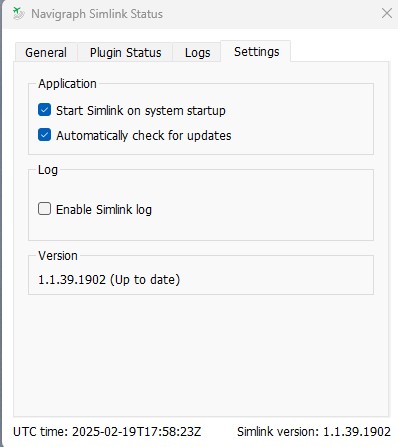
restarted SimLink and at the moment it look good ! correct version and no update available. let’s hope…
Thank you for the updates! We’re crossing our fingers 
2 Likes
Thanks for the help ! 
1 Like