Simlink won’t log in after update – tried everything

Hi all,

Simlink suddenly stopped working for me this weekend, and I can’t log in anymore. It’s been running perfectly for years on the same laptop, and the only change I made recently was updating Active Sky.

Here’s my setup:

AlienWare 18 Laptop with RTX4090 and 64 GB memory

Windows 11 (Edge browser)

MSFS2024 only (no MSFS2020 products installed)

Navigraph Charts + Hub + Simlink + all other Navigraph products

Fenix, SayIntention, AutoFPS, Active Sky FS, GSX, and FSI Panel — these are the only add-ons installed, all related exclusively to MSFS2024. No other products installed.

After the issue appeared, I followed all the troubleshooting steps I could find on the forum. As this didn’t work, I finally did the following:

Uninstalled all Navigraph apps

Deleted all Navigraph folders from %AppData%

Removed all Navigraph-related registry entries

Rebooted router and PC

Installed NetTime for proper time synchronization

Installed Chrome and set it as default browser (to handle the login link instead of Edge)

Reinstalled all Navigraph apps

Login for Charts and Hub works perfectly.
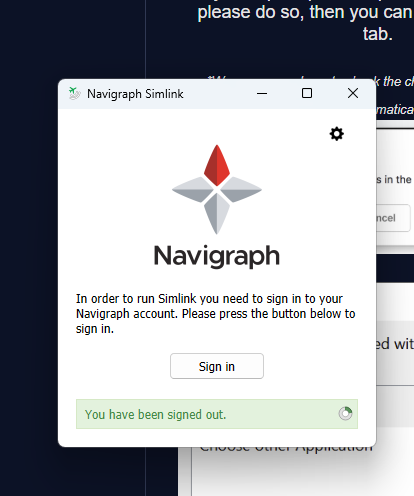
When I try to log in to Simlink, I allow it through the firewall and get the browser popup. I tick the box “Always allow links of this type to open in the app”, but after that, nothing happens — Simlink briefly reacts, then shows “You are logged out again.”

Here’s what the log shows:

[2025-10-14 10:03:51] [1.1.39.1902] [INFORMATION] Configuration (Charts) file or folder is missing. Recreated!
[2025-10-14 10:04:23] [1.1.39.1902] [INFORMATION] OIDC_refresh_tokens_CALL
[2025-10-14 10:04:23] [1.1.39.1902] [INFORMATION] OIDC_start_hybrid_flow_CALL
[2025-10-14 10:04:32] [1.1.39.1902] [INFORMATION] OIDC_authorization_code_flow
[2025-10-14 10:04:32] [1.1.39.1902] [ERROR] LoginController::login_oidcError[7][We had problems authenticating your account. Please check that your computer time is correct and try again.]
[2025-10-14 10:05:06] [1.1.39.1902] [INFORMATION] OIDC_refresh_tokens_CALL
[2025-10-14 10:05:06] [1.1.39.1902] [INFORMATION] OIDC_start_hybrid_flow_CALL
[2025-10-14 10:05:13] [1.1.39.1902] [INFORMATION] OIDC_authorization_code_flow
[2025-10-14 10:05:13] [1.1.39.1902] [ERROR] LoginController::login_oidcError[7][We had problems authenticating your account. Please check that your computer time is correct and try again.]
[2025-10-14 10:08:35] [1.1.39.1902] [INFORMATION] OIDC_refresh_tokens_CALL
[2025-10-14 10:08:35] [1.1.39.1902] [INFORMATION] OIDC_start_hybrid_flow_CALL
[2025-10-14 10:09:31] [1.1.39.1902] [INFORMATION] OIDC_refresh_tokens_CALL
[2025-10-14 10:09:31] [1.1.39.1902] [INFORMATION] OIDC_start_hybrid_flow_CALL
[2025-10-14 10:10:17] [1.1.39.1902] [INFORMATION] OIDC_authorization_code_flow

This repeats several times. The computer time is correct (UTC as usual and verified via NetTime).
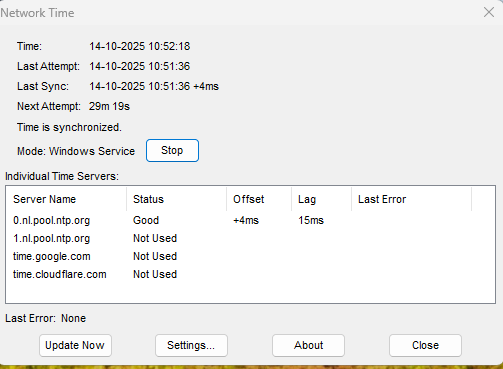
I also disabled Windows automatic time synchronization, so NetTime is now the only service handling time sync.

It seems like something in the authentication handshake is failing, but I’m out of ideas at this point.
Any suggestions would be greatly appreciated.

Thanks in advance,

Marcel

Hello,

Please follow the troubleshooting steps below:

  1. If you are using VPN or proxy settings, please disable them and try again.
  2. If you’re using a multilingual Windows OS, please check this forum solution: Navigraph Forum.
  3. Once you have completed these steps, try again.

If you continue to experience issues, please feel free to reach out to us.

Thank you!

Best Regards,
Vishal Ahir
Navigraph

Hi Vishal,

Thanks a lot for your quick reply! I had actually already tried all the steps you mentioned.
The only thing I hadn’t done yet — just as a trial — was not checking the box “Always allow links of this type to open in the app.”

Strangely enough, that solved it! Simlink now works just like before. I’ve tested it several times, even after restarting the laptop a couple of times, and everything is working perfectly again.

Maybe this workaround can help others as well.
For now, I’m just happy it’s all running smoothly again — time to enjoy some flying! :grinning_face_with_smiling_eyes:

Best regards,

Marcel

Hi Vishal,

I just wanted to follow up on my previous message.

Unfortunately, it turns out that SimLink isn’t working properly after all. Initially, it seemed to be fixed — I was able to test it successfully several times, even after restarting my laptop. However, the issue has now returned.

While starting MSFS 2024 and sitting at the gate ready for departure, I received a warning that required me to restart Active Sky FS. After doing so, I then received a critical error, and at the same time, SimLink disconnected again. I’m now unable to log back into SimLink — it keeps prompting me to sign in, but the login doesn’t work anymore.

I’ve attached two log files:

  • simlink_2025-10-15_1: This was when SimLink was still working initially, but then crashed after Active Sky FS threw a critical error.

  • simlink_2025-10-15: In this one, I had already uninstalled both Active Sky FS and SimLink, restarted my laptop, and reinstalled SimLink — but the issue persists, and I remain logged out.

    simlink_2025-10-15_1.dlog (1.4 MB)

    simlink_2025-10-15.dlog (8.0 KB)

What’s strange is that everything worked fine for a short while. I’m not using any proxy or VPN, and I’ve already tried all other troubleshooting suggestions from the forums.

One thing I did notice in the log is that it says “MSFS2020 detected,” while I’m actually using MSFS 2024. I don’t know if that’s relevant, but I thought I’d mention it just in case.

It’s worth noting that the problem first started appearing after the recent October update of Active Sky FS. I’m not entirely sure if it’s related, but I hadn’t encountered this issue before that update. And with the situation today, it gives me the feeling it is related, but I’m not sure.

I also tried uninstalling Active Sky FS completely, removing leftover registry entries, and rebooting — but unfortunately, this didn’t resolve the issue either.

At this point, I’m a bit stuck and would appreciate any help or suggestions.

Thanks in advance!

Best regards,
Marcel

UPDATE:

I restarted my laptop and started programs again. Active Sky seemed to be working, and when I launched SimLink again, it worked as well. I could see the aircraft in Navigraph Charts. Then I started a flight in MSFS2024. However, somewhere during boarding or taxiing, I believe,

simlink_2025-10-15.dlog (5.9 MB)

Active Sky crashed again, and SimLink in Navigraph also stopped working. After that, I couldn’t get it to work again. I’ve attached the log again, which I previously sent, now including what I hope is the additional information from just before and during the flight (at that time, I tried logging in a few more times, but it didn’t work).

Maybe this info helps.

Thanks,
Marcel

HI Vishal,

I hope this will be my final update on the issue. After further troubleshooting, I contacted Active Sky again regarding the critical error, and it appears that there is a problem with their program after the latest Windows update.

To resolve this, I uninstalled Active Sky, and after restarting my system a second time, SimLink was able to connect again. I’ve since completed three flights without any issues, and everything seems to be working as expected.

Thank you for your assistance, and I hope this resolves the problem.

Best regards,
Marcel

Hi Vishal,

It was all going well. Did a couple of flights with different airplaines. But then when I stoppped MSFS2024, I needed to login in again in Simlink. Attached 2 screenshots where you can see it worked yesterday and today. Als attached the log from today, where it worked and stopped working.

simlink_2025-10-16.dlog (5.2 MB)

I will stop testing now and hope you can find something in the log files.
I noticed the time comment in the logs, but keep in mind that I use NetTime to sync.

Hope yo have an anwer to ths problem.

Best regards,
Marcel

Hello Marcel,

Can you check connecting to Simlink again, please.

A fresh log would be good too.

Thank you,

Hi Team,

Today, I deleted the existing log file and started MSFS2024. At that moment, SimLink was successfully connected. Everything initially worked well, but at some point, it logged out again.

I’ve attached three log files for reference:

  • Copy-1: Captures the moment when SimLink stopped working.

  • Copy-2: Seems to show a successful login after I synced the time via TimeNet (though I’m not 100% sure if this was the fix).

  • Copy-3: The full log of today, including everything from Copy-1 and Copy-2.

After Copy-2, SimLink stopped working again. I tried syncing via TimeNet once more, but that didn’t help.

Somewhere in the middle, I also got a 403 Forbidden error when trying to log in. But that was onl;y once or twice.

Right now, I still can’t log in — every attempt just shows the message: “You are logged out”.

I hope these logs help clarify what’s going wrong. I really can’t figure out why it sometimes works and sometimes doesn’t.

Thanks in advance for your help!

Best regards,
Marcel

simlink_2025-10-17 - Copy-2.dlog (4.9 MB)

simlink_2025-10-17 - Copy-1.dlog (3.8 MB)

simlink_2025-10-17 - Copy_3.dlog (6.3 MB)

Hi Team,

Yesterday, I decided to fly without SimLink — a bit of a shame, but it worked fine.
This morning, however, I wanted to test again to see if I could capture something more concrete in the logs. Below are my findings.

This update contains logs with less data overall, but hopefully more specific details and clearer timestamps that might help identify what’s going wrong.

Log 1 (clean log)
This log captures a clean start-up of my laptop. I launched several apps, including MSFS2024. At that point, SimLink connected successfully.
Just before selecting an airport, SayIntentions notified me that an update was available, which I started. Around that same time (when I started the update, around 09:55–09:56), I got logged out of SimLink.
Hopefully this helps indicate what triggered the logout.

Log 1.dlog (209.6 KB)

**
Log 2 (clean log)**
After closing FlightSim, I made two login attempts:

  • The first one failed.

  • The second one (after manually syncing the time via TimeNet) also failed.

    Log 2.dlog (16.0 KB)

Log 3 (clean log)
After restarting the laptop, I tried logging in again.

  • The first three attempts failed.

  • The fourth attempt, around 10:07, suddenly worked.
    For this log, I cleared the Chrome cache either before the first or before the first two login attempts. I normally always do that when retrying. Since I had already done it during this log, I definitely didn’t clear the cache again before the fourth (successful) attempt.

    Log 3.dlog (19.5 KB)

Just like yesterday, I’m currently logged in again — but it seems that at some point during a flight (or at least when I’m in MSFS2024), SimLink logs out by itself. Today SayIntentions happened to update, but yesterday it also happened without any updates running.

Hopefully these more specific logs help narrow down what’s causing the random logouts.

Thanks again for your support and time!

Best regards,
Marcel