Here you can discuss about how to maintain straight and level flight and how to perform turns.
hello. Just made this exercise and it was already hard to get trough. Very very difficult to keep a steady altitude in the goal to engage the trim. A lot of turbulence too. I thought it was my initial settings but a small modification was made to the sensitivity of the ailerons and elevators. And not very noticable changes. The altitude is my main challenge actually
I must say that this section of the video (sensitivity) was not very clear to me.
My gear is all Turtle beach. Yoke, cadrant and rudder for me. Again, in the initial setup, there is not really much info on this gear. Looking in the settings, some of them seem to be duplicated.
Using MSFS 2020 windows 11
Hi! It may be difficult to get the sensitivies settings configured perfectly for your gear. It sounds from your post like you do not have fine control enough to enable stable flight. Please visit the User Guide for a written explanation of the recommended control sensitivity settings: Navigraph Academy
We have found that the Turtle Beach setup may be extra prone to overreactions on the elevator, so you could try setting a 0.6 curve on it as well and see if it helps you.
Also, once you manage to get fine control, make sure you have the camera set up according to the “Standard View” and fly on nose attitudes. This will enable finer control of the plane.
Hello. After several times to watch the video about the settings, I found maybe the problem.
Located in the sensitivity module, the elevators were set to - 60(-) and -60 (+) Now those two values are set to 0.
Ailerons and rudder are set -60(-) and -60(+)
For the turbulence, I was used to fly with the easy stuff. Now, I must learn to fly under thoses new hard factors and I think it is gonna take a few time to get used to that.
I have to say that the lesson concerning the settings is maybe too fast to really gather all the critical information. I got to watch the video several time to be sure I took note to all of those settings. Even there, I have made a mistake with the elevator settings.
One thing for sure is with all those settings, I have learn much more to navigate between all the available settings in MSFS.
Another difficult zone to set and to understand is the profil generated by Turtle beach stuff. It is very easy to get confuse trying to adjust those settings and profils because several profiles can be generated by each of the 3 modules (yoke, cadrant and rudder/brake pedals) So, it is difficult to know if a profile interfere with another or more.
So thank you for your help and I will experimente this new way to fly but it is really interesting and your team is doing a great job
André, Canada
Hello again! Glad to hear you have made progress with the settings! I know setting up the Turtle Beach can be quite demanding, especially the trim wheel. I hope being able to pause the video and re-watch it made it easier to set things up, even if it took a few tries.
And yes, just like in real life, it is quite demanding to fly with some turbulence, as it forces you to constantly scan your pitch attitude and make small corrections. I suggest really learning how to fly the nose attitudes and using the camera viewpoints we’ve suggested. After some time practicing with this, the corrections will become wired into you, and it will feel much more stable. Good luck and let us know if you have anymore questions.
I’m finding this level quite difficult, and since it is the first real one about flying this is quite discouraging. I cannot maintain speed and altitude at the same time. Is one suppose to adjust the throttle? Even though the ailerons are set at -0.6, I still oscillate with too much, too little pitch to maintain altitude while turning.
if finding it hard to get trim settings just right, i use AuthentiKit Tuning App,
link here Home
this has helped me get smoother level flight.
Delete trim elevator trim setting in msfs.


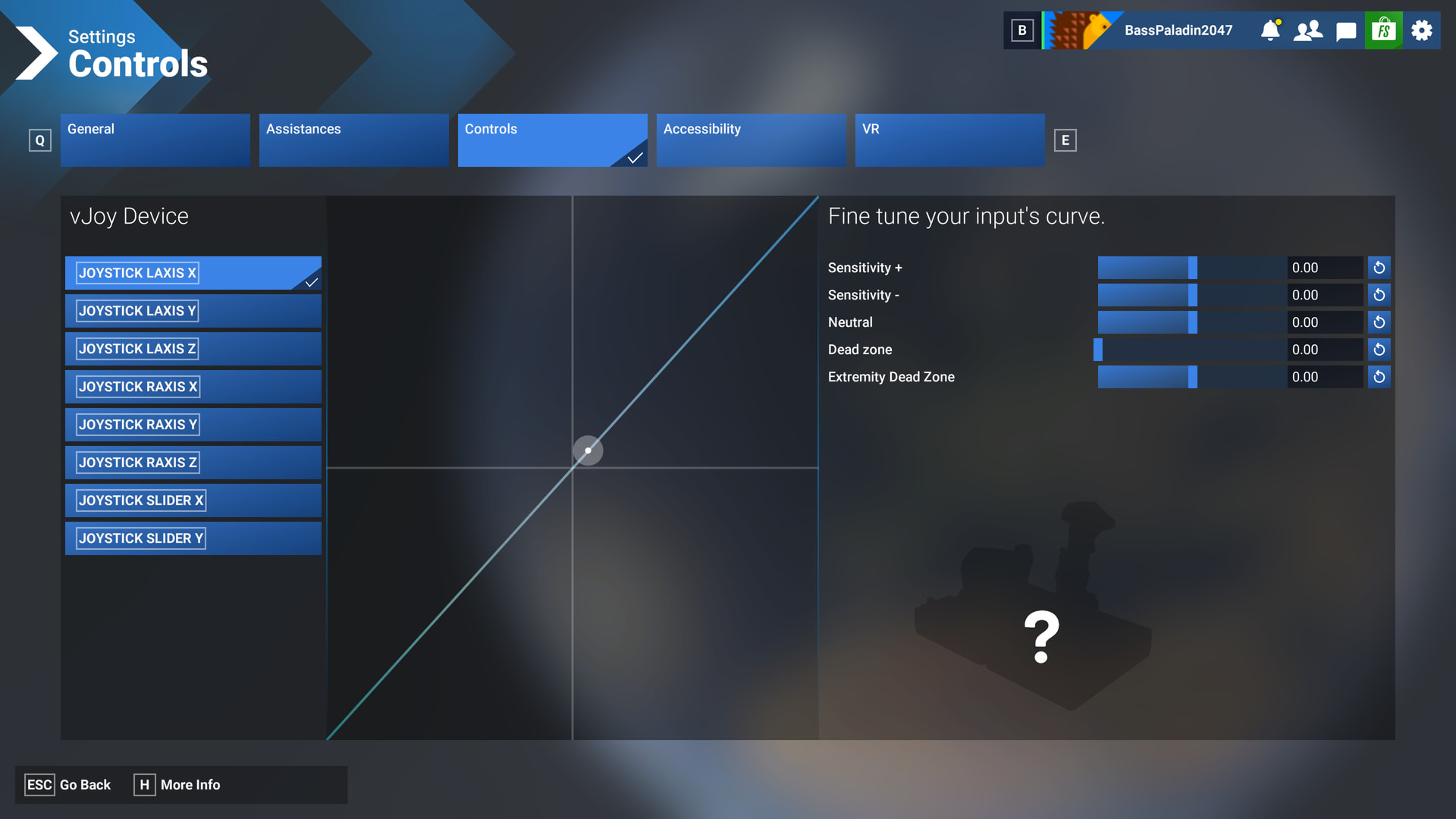

Uh, that was not easy… first lesson try was a mess, then I saw, that my settings were not properly set (I’m still messing up general, airplanes and specific presets). Second try was way better and successful, but… To start the turns in coordinated flight I have to use only a minimal amount of rudder, very subtle. Even with my sensitivity set to -0,6 for both axis I have the feeling that no rudder at all would be easier (and sufficient) for coordination. But that can’t be true in real flight, is it?
We have found that the adverse aileron yaw is underrepresented in MSFS 2024. The real Cessna has a very pronunced yaw effect when ailerons are used, and this works pretty well in MSFS 2020, but with MSFS 2024 there was a reduction in the yawing motion. This may be cause for your experience. Keep adding a small amount of input and set your sensitivity to somewhat lower values if needed.
Some speed deviation is OK. If you are flying coordinated and do not oscillate in pitch, and use a maximum bank of 30 degrees, your speed should only reduce by a few knots. If you find your aileron control overreacts, then you may consider increasing the sensitivity setting even further. This may be because of the roll axis on the control device has a narrow control region.
However, remember that if altitude oscillates, the most common cause is an improper (or fluctuating) nose attitude. The video covers what attitude to maintain in the standard view. As you bank, use pitch up inpuits to maintain this pitch attitude, and hold it steady through the turn.
I really appreciate not being left alone with the lessons - thank you for the additional training lead here in the forum!
Hello. I need help for this lesson because I don’t know where to start to solve my probleme.
Situation
On november 24, 2025, Navigraph (third party) offer to get pilote lessons through their platform using Microsoft flight simulator as the main software to pilot the virtual aircraft. At the end of all the lessons, the student have to pass the final exam in the way to get virtual private pilot licence.
Before getting to the first lessson, the user have to adjust the settings of MSFS (2020 in my case) According to the Navigraph team, those settings are probably the most important thing to do before going further in the lessons.
Those settings are located to control options, cockpit options and assistance options of MSFS.
My main issue came with the first lesson where the user have to pratice leveling the plane combined with right and left turns. During this lesson, the plane is already in flight above Miami, Florida, USA. All assistance option are set to HARD and few instruments are visible to the pilot. The idea is to force the pilot to use the visual dimension as point of reference. Finally, considering the interdependance between the dashboard and the horizon.
In this lesson, it is really really hard for me to stabilize the atltitude. It was like the feeling of a lot of turbulences over Miami region. In addition to the problem, the plane is swigging right left giving the feeling that the rudder is loose or always moving in both side. After 4 or 5 minutes of swingging in both ways, I wasn’t able to continu the use of the simulator because I was almost sick to see what was going on the screen.
Realizing the situation, I decide to return to my default setup with my sim and it was a mess. I got really hard time to understand what was going on. Many hours to stabilize the situation and I was exasperated in front of my computer seeing all the trouble I was getting with this third party sotware.
After reading the VelocityOne documentation and support on Turtle beach web site, I have noticed this paragraph maybe important :
« 6, Familiarize yourself with the buttons and controls. You can find a full breakdown of what each button and control does – for the Default profile (active out of the box), but also for the two other profiles initially available – here. Those profiles are: Default Mode, Single-Engine Prop, and Twin-Engine Jet.
PLEASE NOTE: In the Microsoft Flight Simulator menus, make sure the profile selected is the correct profile you want to use – and that the profiles in both the Flight Simulator menu and on the VelocityOne Flight itself match.
You can also select a specific profile using the FMD, and then enter the Training Mode to see in real-time what each button does – once you are in the Training Mode, whenever you press a button or otherwise engage a control on the VelocityOne, the FMD will show what that feature that button is assigned to control. »
At this point, I decided to delete the few customized profils on VelocityOne yoke, cadrant (quad) and the rudder. After those modifications, all those 3 modules were set to the default profil established by Turtle beach. On VelocityOne, the flight management display (FMD) was ok for the profil (single engine-prop) and it was set like this since the beginning of this adventure. With those modifications, the simulator start to stabilize on normal use without using Navigraph lesson.
Questions remain with those default profils.
When using Navigraph software, we must adjust setting in the controls options. Doing that, force the user to create a new profil that is not visible on the FMD. How do I match the profil on the yoke and the simulator? Or maybe, I have to leave those controls options unchanged to make things work.
Do I must understand there are only 3 profils available on the yoke and creating a new one on the simulator won’t be recognized on the yoke and will create disfunctions?
What about binding keys modifications? Will works?
My gear
Turtle beach VelocityOne flight + SIP
Turtle beach rudder pedals
Windows 11
MSFS 2020
1 Gb optical cable
My desktop is 18 months old and build for games
All hardware and softwares are updated
I don’t blame any person on this problem but I just try to understand. This morning, A email was sent to Turtle beach team to help me on that. And, I have just wrote a topic on that too on MSFS forum.
Thanks for your support
André, Canada
I receive perfect score on coordination without using any rudder input at all.
with all the assistance options set to HARD ? With Turtle beach gear?
I have autorudder off and I am not using any rudder input. I don’t understand why gear is relevant if I am not using it.
In what simulator are you flying? MSFS2024 has underdimensioned adverse aileron yaw. And it also depends on how much aileron you are using. If you are very gentle with it, not a lot of uncoordination will occur.
Good to know. I’m using MSFS2024. No point in using rudder during turns then. I’m glad I haven´t invested hundreds of $ in rudder pedals.
This is not the first time I’ve tried to start and complete an actual flying course. I always conclude if real aircraft control were this hard, no one would do it. Then I give up and go fly airliners on autopilot. There’s no way it can be this hard in real life. Holding altitude, speed and bank at the same time in MSFS is nearly impossible and this is where I usually quit and go back to having fun. I have a yoke, pedals and trim controllers.
Just had my first try for turns in VR mode. Totally different I have to admit. Not the steering itself of course, but the feeling of the views and perspectives is completely off comparing to 2D. I tried to adjust my sitting position to a normal position, but checking horizons and angles is a new challenge 
Hi! I am online in MS2024 Lesson 3 and SimLink seems to work, but after try to repeat Lesson 3 after a 56% Fail result, there is no recording of my flight and Programm is not switching to “Lesson in Progress”, so that no debriefing is possible. What can be the issue?