Here you can discuss the effects of controls.
Hello,
please tell me how to set the input value of the e.g. elevator trim to 4 ? My controls show the value of 0 and I wonder how to change this value ?
I also don’t find the focus mode of the cockpit camera in my settings. How to get there ?
Thanks for your advice,
Klaus
In MSFS2024, there are actually two keybinds with identical names for the trim wheel. One is marked as analogue and the other as digital. Try the other keybind and you should see the input value field enabled. It is quite confusing and very easy to pick the wrong one. We will add a clarification to the video on this.
Thanks much for your quick reply. The action settings in my MSFS2024 contols have a airplanes analog and annother field to the right for keybinding of actions. next to the right field I see the gearwheel simbol for the action settings one for primary and a secondary one. the first option “input repititon” is marked in the right box but cannot be unmarked. The field named input value can be highlighted but the zero value in it can’t be changed.
Can you please also answer the question regarding the focus mode in cockpit camera and where to find it ?
Thanks,
Klaus
-----Original-Nachricht-----
Hi again Klaus,
The correct keybind is called “Elevator Trim Wheel Increase” and “Elevator Trim Wheel Decrease” and you are looking for the digital variants. You should be able to enable input value on these keybinds. Let me know otherwise.
I am not sure what you refer to when speaking about Focus Mode. Come back and I’ll do my best to assist! Also check out our User Guide to find a list of all the keybinds written down for easier reference. Navigraph Academy


Hello mtrankell,
regarding the settings of the cockpit camera Focus Mode please see the video of Andreas Goodholm about the settings and go to the sequence od minute 11:54 - 12:01 . I did not find a way to get there in my controll settings even when searching for keyboard and the camera section.
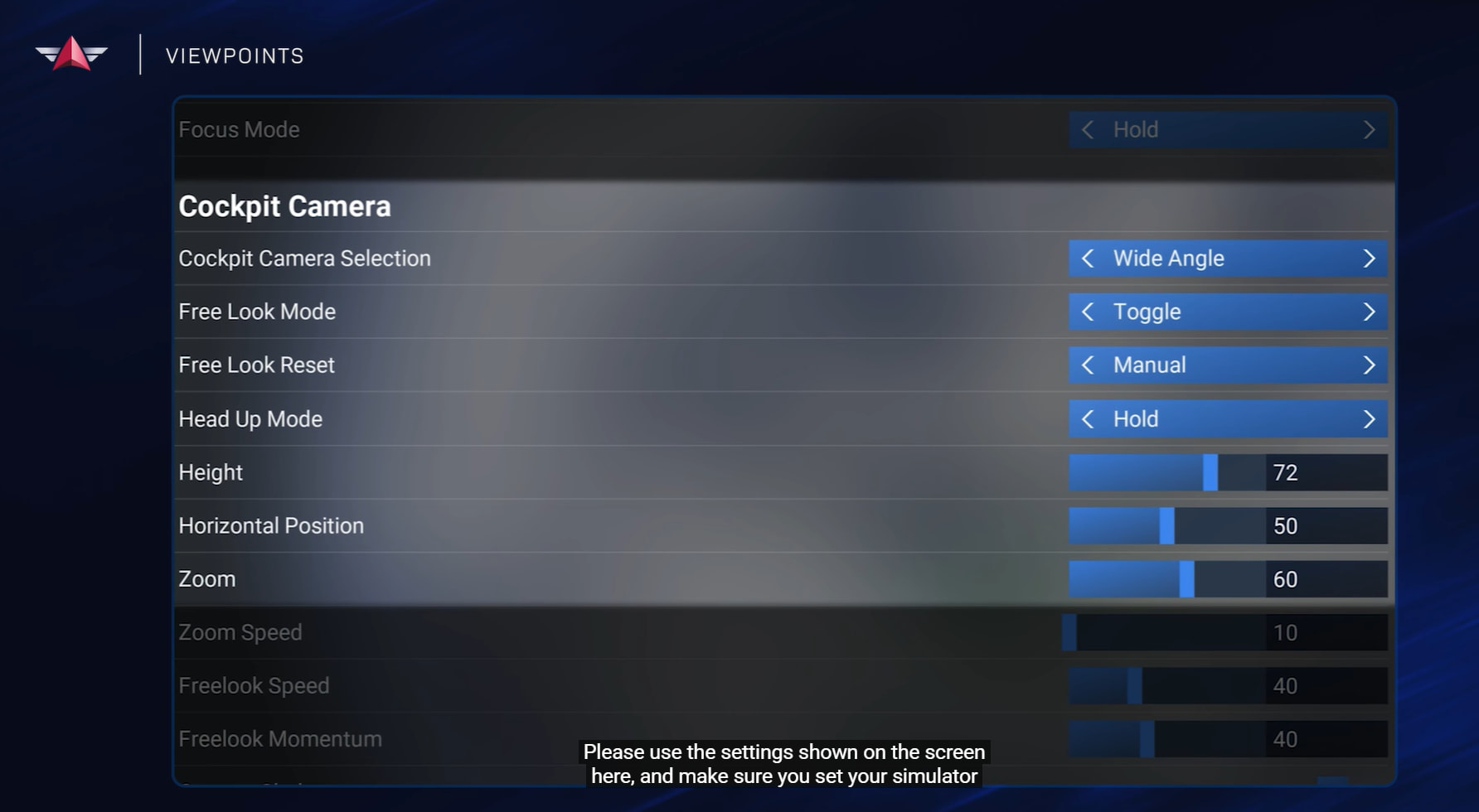
Got you and found it in Settings General section Camera !
Thanks much and Kind regards,
Klaus
Gesendet mit der Telekom Mail App
– Original-Nachricht –
Does this seem strange just for me?
Air has weight, and whenever something with mass is pushed in one direction, an equal reaction occurs in the opposite direction. That’s Newton’s third law in action. By deflecting the airstream downward, the wings generate an opposite force upward. This opposing force is lift, the very thing that lets us overcome gravity.
The statement does risk being confused with reactive propulsion (like rockets or propellers), and that’s a significant pedagogical problem.
Why Bernoulli/pressure matters for the full picture:
Without mentioning pressure differences, it sounds like the wing is just a flat surface batting air downward (like a paddle). In reality:
-
The curved upper surface accelerates air, creating low pressure above
-
The bottom surface has higher pressure below
-
This pressure differential both creates the upward force AND causes the downwash
The downwash is a consequence of the pressure field, not just a mechanical “pushing.”
For someone learning about flight, this explanation alone could lead them to think wings work like helicopter rotors or that a flat board would work just as well. The pressure distribution is what makes the airfoil shape so effective and distinguishes aerodynamic lift from simple reactive thrust.
Bernoullis principle as the primary explanation for lift has stopped being taught in flight schools. Lift generation is created by a reactionary force, although of course the air stream velocity and the related pressure changes plays a role in this. For example, it explains why the upper part of the wing also helps in redirecting air molecules downwards.
Explaining lift in detail is beyond the scope of this forum, but I can quote the NASA article on this, which is one of the first hits on Google currently:
There are many explanations for the generation of lift found in encyclopedias, in basic physics textbooks, and on Web sites. Unfortunately, many of the explanations are misleading and incorrect. Theories on the generation of lift have become a source of great controversy and a topic for heated arguments. To help you understand lift and it’s origins, a series of pages will describe the various theories and how some of the popular theories fail.
Lift occurs when a flow of gas is turned by a solid object. The flow is turned in one direction, and the lift is generated in the opposite direction, according to Newton’s Third Law of action and reaction. Because air is a gas and the molecules are free to move about, any solid surface can deflect a flow. For an airfoil, both the upper and lower surfaces contribute to the flow turning. Neglecting the upper surface’s part in turning the flow leads to an incorrect theory of lift.
Source: https://www.grc.nasa.gov/www/k-12/VirtualAero/BottleRocket/airplane/lift1.html
Hi I was having a real hard time figuring out how to deal with adverse law in MSFS24, I cannot really tell if it’s happening at all.
I watched some videos of real C172s and the affect is much more pronounced (most notable here: https://www.youtube.com/watch?v=3ZTPSUyD4bA) and I just can’t get this to happen. I can rock the ailerons left and right quite a lot, and the nose stays centered without any additional rudder input. I’ve triple checked that auto-rudder is NOT turned on and it definitely is not.
I was wondering if I was going insane, so I tried the same experiment in X-Plane 12, and immediately the affect is much more noticeable there, so I am wondering if it is something different in the sim? Should I expect this or am I looking at the wrong thing?