In the landing calculation section I can see actual landing distance required as well as runway length. In the take-off section however I can only see runway length but not “actual take-off distance” .. is this data actually there or am I missing something? Thank you.
Hi, this data is not normally included in real-world takeoff reports either. The reason is that it isn’t that important to know. What the pilots really need to know are the thrust setting, flap setting, speeds, and other configuration settings to conduct a safe takeoff. The tool takes care of making sure that these settings work in the available distance.
Also note there are several distances that need to be considered: The normal takeoff distance, accelerate-go distance (in case of an engine failure), and accelerate-stop distance (in case of a reject), for example. There isn’t just one universal takeoff distance value.
Some tools will however show the stop margin (which is the remaining distance in case of a reject at V1). But rarely will they show all of the distances, at least not on an ACARS printout or OFP-formatted takeoff report.
Tools with graphical UIs sometimes show more of this data too, such as SimBrief’s Performance and Tools section.
Best regards,
Ok fair enough. Is there an option then for recalculating takeoff from an intersection, not full runway length?
Indirectly yes, but you would need to look up the distance available from that intersection and enter it manually into the takeoff performance options:
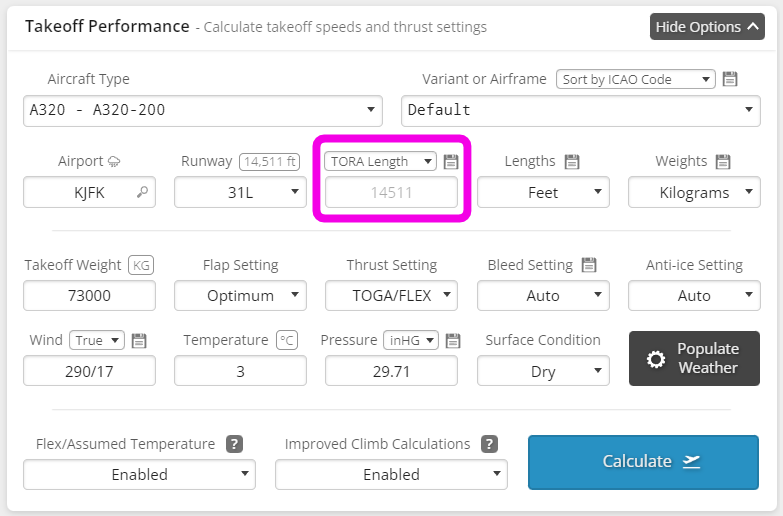
Some airport charts indicate the distances from intersections, but for other airports these distances can be harder to find. SimBrief allows you to directly enter TODA/TORA/ASDA distances, or alternatively, an amount to shorten the runway by.
Unfortunately it isn’t possible to, for example, select an intersection and have the distance auto-populate, but this is something we’d like to add down the road if we can compile the data.
Best regards,
1 Like
OK sounds fair. Thank you for your time.