Hello,
After subscribing, I installed everything as the video indicated. However, when I load a flight in Navigraph Charts and press the button in the menu to make the aircraft visible, I get the message: “Cold not Connect to simulator. Simlink needs to be running.”
If I reinstall Simlink and start the simulator and Navigraph Charts with the flight, the aircraft is visible. What is the problem?
Navigraph Simlink is used for communication with flight simulators. To establish this connection, you need to install Simlink plugins into your flight simulator, except for MSFS 2020/2024.
Could you please let me know which flight simulator you are currently using? This way, I can guide you on the correct installation process.
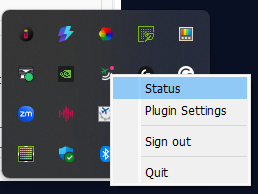
Thank you for the information. If you are using MSFS 2020, there’s no need to install the Simlink plugins. Just make sure you log in with your Navigraph account in the Simlink application and that the Simlink application is running when you start MSFS 2020.
For verification, do you see the Simlink status screen like this?