Recently, I’ve noticed how my PC never spins down its fans etc as I’m used to when exiting out of MSFS and when checking what is causing the CPU to be busy with something, I noticed how a Navigraph process constantly loads the CPU with about 5%. Even when Navigraph (Hub) isn’t running which seems wrong?
I usually start Navigraph HUB the before every flight to make sure there haven’t been any updates before I launch the sim (MSFS2024) but after doing this, I also make sure to close it from the System Tray bar. Where it will end up if you simply close Navigraph HUB.
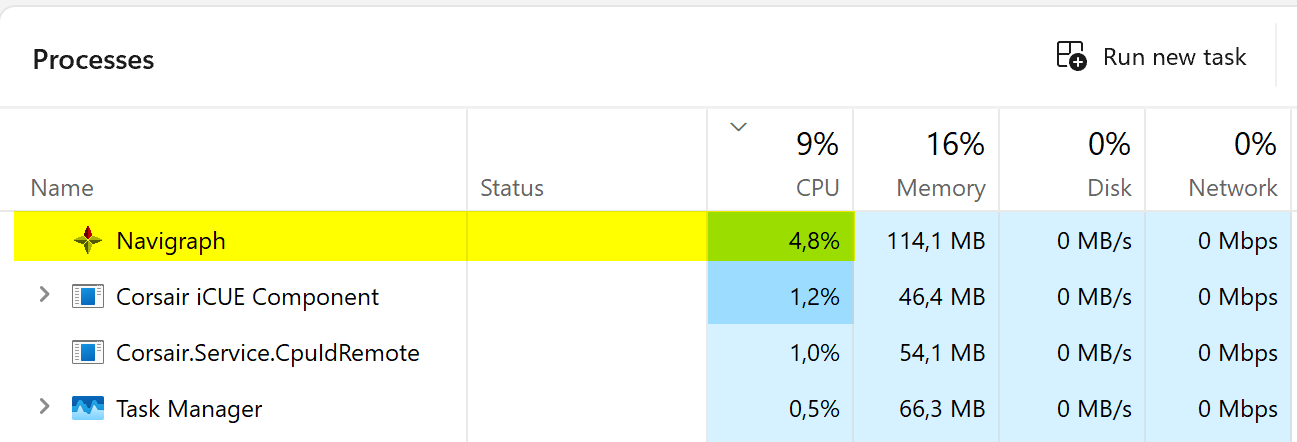
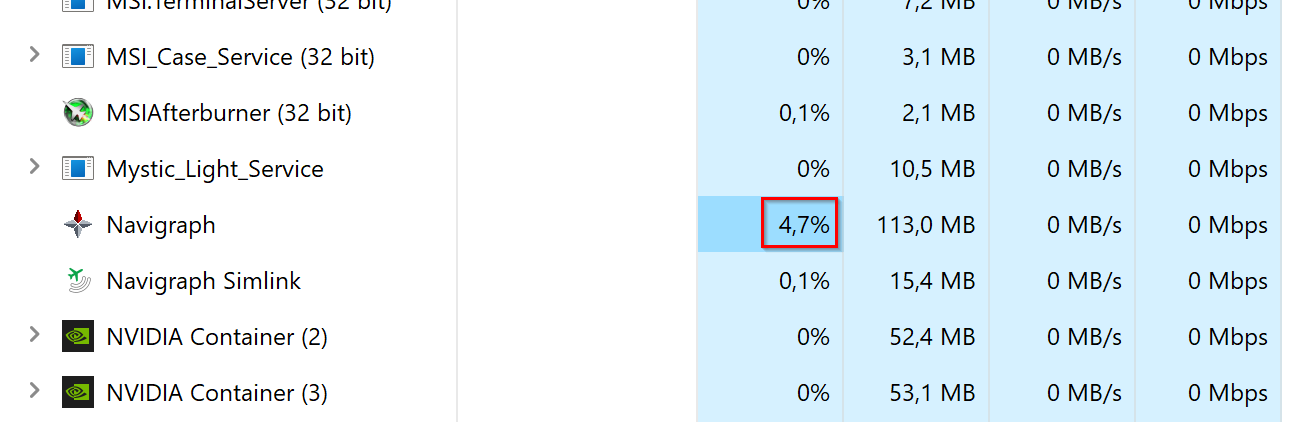
So question is, why do I find a Navigraph process still running and constantly consuming around 5% of the CPU as seen below?
Never seen this in the past and the only thing which changed here if of relevance is I started using MSFS2024 instead of MSFS2020. Have both installed at this time until I’m fully happy with MSFS2024.
No, I’m not using Firefox and the issue isn’t Navigraph HUB is restarting but how it’s not closing completely.
I tried this again yesterday and had Task Manager running and watching the Navigraph main process and I believe it was like 4 sub processes. I then closed it by right-clicking the icon in the System Tray and chose Exit.
Doing this, the sub processes were closed looking at Task Manager but the main process kept running with the increased CPU usage as seen above. Until I did End Task manually.
I’ve actually always had Navigraph Hub running in the background (albeit I never checked its CPU usage) – I somehow just assumed it was by design (although I never understood why it would need to). I don’t have Firefox on my sim PC, FWIW.
I will also try this when I am back home on Monday or Tuesday.
Only reason I found out about this was since as mentioned in my first post, I noticed how the fans in my PC kept spinning at a higher RPM compared to what they usually do when the PC is idling. When I checked why, I found the Navigraph process taking up these about 5% of the CPU.
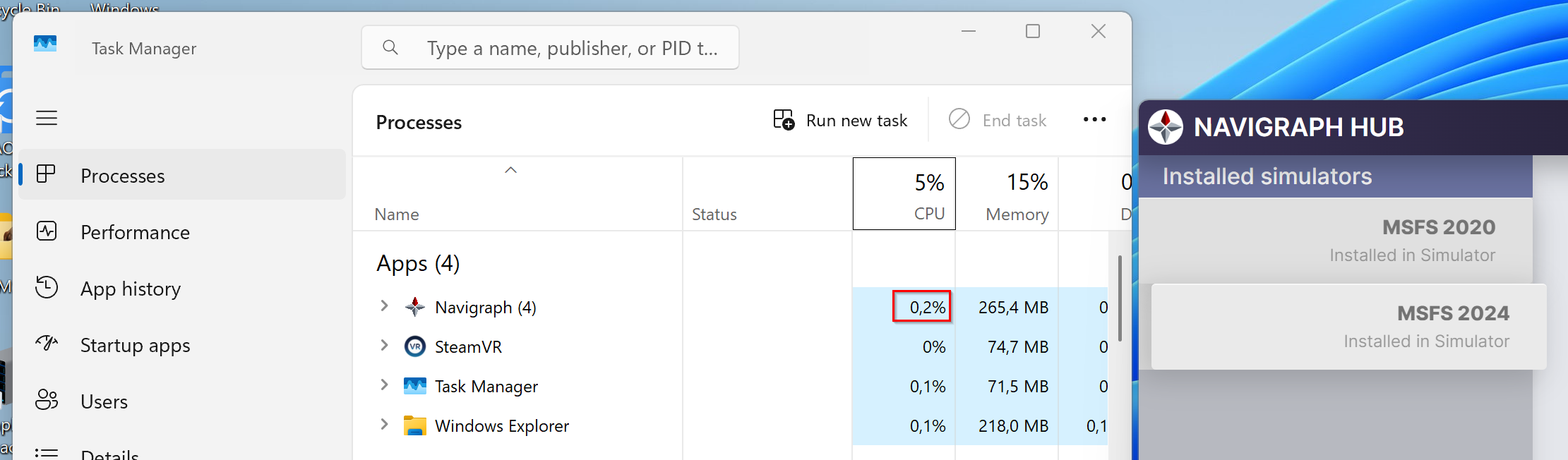
I just did a test over here and interestingly enough, when you have Navigraph running actively on your screen, the CPU consumption is very minimal as you can see in the first screenshot below. However, after having deselected the option to have Navigraph running in the background and you then close it, it will still be running as a background process and now…consuming about 5% of the CPU as seen in the second screenshot.
Just had a look and noticed how I was on 1.2.18. Since I didn’t find a way to check/search for updates in Navigraph HUB, I just went ahead and downloaded the latest version from your website.
The downloaded setup file also didn’t say in its title what version it was. So I ran it and saw how it started installing. No questions asked about already having Navigraph HUB installed nor informing me about any update.
After abruptly ending and I heard the Windows “Chime” sound in the background, I learned how in fact what I just did resulted in uninstalling Navigraph HUB instead. Which felt really strange and even more so considering I didn’t get a single message telling me what was going on after running the setup file.
So, I then ran the setup file again and this time, it did install Navigraph HUB and I ended up with the same version as before this exercise, 1.2.18.
The good news is the initial issue I reported seems to be solved. Because I no longer see Navigraph running in the background after exiting out of it. Which of course is how it should be when you have configured it to not run in the background.
So what did you do on your side to fix this? What was the reason for this happening in the first place?
Would also like to know why there even is an option to have Navigraph HUB running in the background? What purpose would it fulfill to have it constantly running in the background or starting with Windows which is the other option when right-clicking the icon in the System Tray Bar.
Spoke too soon apparently, just after sending my post above, I noticed how the fans on my PC were spinning faster than normal again when just having Chrome running and sure enough, there it was again, Navigraph.exe running as a background process looking in Task Manager.
So this in a way makes sense since I didn’t really understand how it was suddenly working even when I clearly didn’t have any updates for Navigraph HUB.
In short, issue remains using the latest version available for download from your website.
Hub always updates itself when there is a new release so there is no need for downloading it explicitly. The reason why it does not have any information about version in the filename is to not break links in for example the forum when it’s referenced
The reason why it runs in the background as a tray application is currently mainly because of MSFS 2020. The navigation data comes as two different packages and these needs to be placed in a certain order to correctly override the sim base data but also not interfering with other scenery. For this reason Hub keeps track of the Contents.xml file in the simulator and when that file changes (typically when you install a new addon that modifies the Contents.xml)
Hub reorganises the entries in the file afterwards so that everything will load in the correct order.
Hub does this by listening to events from the filesystem so there is no continuous activity going on. When Contents.xml changes, the filesystem sends an event to Hub which then acts on that event. Hub should absolutely not take up 4% CPU when in the background, it should be 0% or very close to 0%.
We do however not support other tools that also manages the Content.xml such as addon-linkers. If you are running a second application that is also watching the Content.xml file, there is a risk that it will be a ping-pong situation between the applications where both are acting on changes the other app made in a loop, in such case you would most probably see unusual CPU usage as a result.
This also only happens when you have navigation data from us installed in 2020 specifically. There is no management of the Content.xml when the navigation data is not installed. Also for 2024 that has a different setup there is no such activity going on at all.
Do you run any software that possibly is writing to Contents.xml?
Just tried out 1.2.19 and first time, it seemed to work. Where exiting out of Navigraph HUB didn’t leave a background process behind. However, when starting it one more time to make sure the issue was resolved, the background process was there again consuming around 5% CPU after closing Navigraph.
MSFS Addon Linker (the most common such software for MSFS, if I understand it correctly), does not touch the Content.xml file (at least not with its default settings).
(my MSFS 2020 Content.xml is tracked in a local git repository so I should notice if it changes, I do check the git status before almost every sim session)
Most of what MSFS Addon Linker does is merely creating symbolics links (or whatever the Windows equivalent is called) into the Community folder so MSFS can pick up addons located elsewhere (like on a different drive). I do not know whether it also listens for any file system events, however.
So it is meant to run in the background by design then, I guess I learned it earlier but I didn’t remember the reasoning behind it, thanks
I do find it bit unexpected that “quitting/closing” the application manually from the system tray would leave this background process running – I understand we then lose some functionality but that should nevertheless be up to the user to decide?
I don’t personally have 5% CPU usage from that process (at least that I can remember) so for example I don’t need to close it manually myself, but having the option would be nice.
for info, i have the same problem as WebMaximus .. hopefully there will be a fix because having the process constantly using the cpu and fan spinning (that’s how i discovered it) because of navigraph hub seems a bit overkill .. for now i just have to kill the process manually which is not very good (if i forget the fan spinning will remind me). I don’t recall having that issue with older versions.
Also please don’t spread wrong informations, Addons Linker does not continuously monitor nor changes files automatically, there is a content.xml editor but it’s just something you can use or not and all changes are made only by clicking manually on the ‘save’ button if you made some changes. It’s mainly used to locate/disable default addons quickly without going inside the sim, you can’t even add addons or move them up/down via that editor and it’s only for v2024.
Being here for this, let me take the opportunity to thank you for the great navigraph products
Okay, we will investigate this. It should definitely not leave a running background process on quitting and no process should ever take 5% of CPU except for when actually installing packages.
I did not intend to spread false information about any software; I am just aware that other software than ours makes modifications to the Content.xml, which could be an error vector. That could have been worded more wisely.
We will investigate and release a new version as soon as we have found the cause.
I have the same problem for awhile now. Navigraph Hub somehow keeps running in the background when I close it. If I open and close Hub a few times than that number of times Hub stays in the background. In this case I opened and closed Navigraph Hub 5 times and this is what i get in task manager and all the Navigraphs tasks are using quite a load on the CPU:
Hey guys, a new version v1.2.20 is out. It is normal that Hub takes up several processes, but they should not consume any CPU as you are demonstrating. Please report back if you still see this happening.


 .. for now i just have to kill the process manually which is not very good (if i forget the fan spinning will remind me). I don’t recall having that issue with older versions.